AI Models

The Three Stages of AI Use — and Why the Real Question Is Not Which Model Is Best

AI in a browser tab works, and it never compounds. This is the map behind my second film — three stages, from the tab to a system you own — and the question it builds to: which stage you are at, and what it would take to move up one.
By Bruno Oliveira • 16 min read • September 30, 2026

The Map, in Numbers

3 Stages, from a Browser Tab to a System You OwnThe map presented in Film 2, first published on LinkedIn on 24 September 2026
40+ Skills in the System on My Own MacA floor, not a total: the film's figure, checked against the live system when it was made and again on 29 September 2026
10+ Scheduled Routines Doing Real WorkAlso a floor, checked the same way: the film says 10, and the live count was above it both times
80% time savings on AI-assisted tasksAnthropic
6% of orgs are AI high performersMcKinsey

"Copy in, paste out. It works. It just never compounds." My second film opens on AI in a browser tab and those three sentences. An answer arrives in the tab, it is pasted into the real work, and the tab is closed — and nothing from the exchange is kept anywhere the firm can build on.

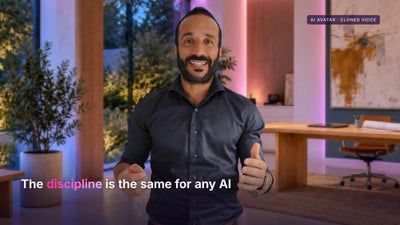
Film 2 of the series, first published on LinkedIn on 24 September 2026. 64 seconds, with sound.

A note on what you are watching. The presenter is an AI-generated likeness of me, made from my own recordings and my own voice. What it says is what I think, and I signed off every word.

The film is a map of three stages of AI use, and before its closing line it asks a question about stages rather than tools. A 64-second film has room for one line per stage. This page takes that question and answers it properly: why the first stage never compounds, why the choice of model matters less than the stage, and what it takes to move up one.

The argument in 60 seconds

  • There are three stages of AI use, and what separates them is where the AI sits relative to your work. Web AI in a browser tab; configured projects that hold your instructions and context on someone else's platform; and an operating system that works in your own files and tools, on your own machine.
  • Stage one works, and it never compounds. When AI is used as copy in, paste out, each answer can be excellent, but the context is typed in again next time, the good prompt stays in one person's notes and the output is pasted away, so nothing becomes an asset the firm keeps.
  • Stage two remembers who you are, and it still lives on someone else's website. A standing brief is a real step up and needs no code; the workspace still works with what you hand it, inside a product you rent.
  • Stage three is where AI compounds, because the context, the tools and the routines accumulate in a system the firm owns: one that reads your documents, uses your tools and runs scheduled work while you sleep, with confidential data walled off by design.
  • The question is not which model is best. It is which stage you are at, and what it would take to move up one. At stage three the model is a setting: when the default model behind my scheduled routines changed in September, every routine followed without an edit.
  • Move one job up one stage. The unit of progress is the recurring job you repeat most, not the whole firm at once.
📋

Get the AI Opportunity Spotter™

The 1-page framework I use to identify highest-impact AI use cases in any business

In this article:

  • Generating table of contents...

What Are the Three Stages of AI Use?

Web AI, configured projects and an operating system. Stage one is an assistant in a browser tab, used by conversation and copy-paste. Stage two is a workspace that holds your instructions and context, so the assistant opens already briefed. Stage three is a system on your own machine that works in your files and tools and runs scheduled work.

What separates the stages is not the model: the same model can sit behind all three. The difference is where the AI sits relative to your work — how much of the work it can see, what it is allowed to do with it, and whether anything it learns stays with you once the conversation ends.

That makes it a map of architecture, not of ambition or skill, and a different map from the three zones in Engineer Trust, which place each workflow by its judgement, its audience and its failure mode. The zones describe what AI should do with each piece of work; the stages describe where the AI doing that work lives. The full map, with what the crossing looks like inside a firm, is From the Web to the Workshop. This page is about the question the film builds to.

Why Does Stage One Never Compound?

Because nothing it produces is kept anywhere the firm can build on. Used the way the film describes — copy in, paste out — the context is typed in again at the start of each conversation, a prompt that works stays in one person's notes, and the answer is pasted into the real document before the tab is closed. Each exchange can be excellent; none of them makes the next one easier.

Compounding has the opposite shape. Work compounds when this week's effort makes next week's cheaper: context written down once and read every time after, a tool built from a job done three times, a routine that does the preparation before anyone asks. At stage one the saving is real, but it is paid out once, per answer, and then it is gone.

The film is careful about what stage one lacks. It calls web AI powerful, but at arm's length from your files, your folders and your actual work. An earlier cut said "disconnected from". I changed that phrase before the film went out, because it claimed more than is true now that browser assistants have connectors that reach into cloud storage such as Google Drive. The corrected sentence was generated in the same cloned voice and fitted into the same window of about 5 seconds, so the rest of the film's timing did not change.

Arm's length is the right distance to describe. Connectors now reach into services such as Google Drive and Microsoft 365, and some can edit documents in place, so the assistant can touch your work. It still works from the outside: through the access each connection was granted and the operations it permits, from a conversation that lives in the vendor's product. The conversation, its history and the assistant's own memory stay in that product; anything the firm wants to keep in its own files has to be saved or exported there, one deliberate step at a time.


Stage one of the map in the film: Web AI, ChatGPT or Claude in a browser tab, at arm's length from your files, your folders and your actual work

What Changes at Stage Two, and What Does Not?

A configured project gives the assistant a standing brief. Your instructions, your standards and the context it should always hold are set once, so it opens already knowing how you work. That is a real step up, and it needs no code. What does not change is where it lives: on someone else's website, working with what you hand it.

The film gives stage two one word of praise and one warning: "Better. Still living on someone else's website." Both halves matter. The first is why stage two is a sensible first move for any recurring job: the brief you write for it is never wasted, because it is also the first thing stage three needs.

The second half is the ceiling. The hosted assistants keep adding pieces of stage three — memory that persists between conversations, tasks on a schedule, connections into your storage — and each piece is useful. But each piece stays inside the product, reaching only as far as that product allows, and the brief, the memory and the history live in an account on someone else's platform. Stage two is a better room. It is still a room you rent.

💡 A Better Model at Stage One Is Still a Better Tab

Upgrading the model improves today's answer and leaves nothing behind for tomorrow.

Moving up a stage changes what accumulates: context written once, tools built from repeated jobs, routines that run without being asked. That is the difference between getting faster and building something, and it is why the stage, not the model, decides whether the effort compounds.

What Makes Stage Three an Operating System?

At stage three, the system that uses the AI runs on your own machine, in your own files, tools and cloud. It reads your documents, uses your tools and runs scheduled work while you sleep, and the confidential material is walled off by design. The model may still be reached in the cloud; the system that wields it is yours.

The film's card for stage three reads "AI on your own machine · your files · your tools · your cloud", and it deliberately names no product. An earlier version named the tools behind my own set-up. I took them off because the list was narrower than the truth — the same stage can be built in more than one application, on more than one cloud — and because a list of tools reads as a barrier when the point is the architecture. The applications are named once, in the questions near the end of this page.

What matters for this page is the property the film's closing line names: it compounds. Because the system works in the firm's own files, the instructions, the tools and the routines accumulate there rather than in a product account, and what is built for one job is there for the next. That is the start of what I have called the company brain, the one layer of the stack a rival cannot rent.

The boundary is part of the same design. What the system may see is decided before it runs and written down where the team can read it, which is the job of a firm's first AI doctrine.

What Does Stage Three Look Like in a Working Week?

On my own Mac, that system runs more than 40 skills and 10 scheduled routines. That is the film's line, and it was deliberately understated: both numbers were floors when the film was made, and when they were checked again for this page, they still were. Not a demo. My actual working week.

A skill is a capability the system can reuse: a procedure written once, so that a job done well the first time can be done the same way every time after. A scheduled routine is work the system owns: it starts at a set time, does its job and reports what it did, whether or not anyone is at the desk.

The numbers are not the point, and they will change. What they stand for is a shape any firm can build: preparation that used to wait for a person arrives already done, a check that used to depend on someone remembering runs at a fixed time, and a job that used to be one person's knack sits in a file the next person can read. That is what compounding looks like from the inside.

Frame from the film: the AI avatar of Bruno Oliveira beside the figures 40+ skills and 10 scheduled routines, under the words On my own Mac, today

The web is where you try AI. The operating system is where it compounds.

Why Is "Which Model Is Best?" the Wrong First Question?

Because models change often, and the stage decides whether anything you build around them lasts. A better model at stage one gives you a better answer in a tab you then close. At stage three the model is a setting inside a system you own, and the system carries on when the setting changes.

I saw this in my own system in September. On 22 September the default model behind my scheduled routines changed, and every routine followed without an edit, because each was set to the default rather than to a model's name: the last run on the old model started at 18:06, and the first runs on the new one at 18:10. Two days later an audit found 3 places elsewhere in the set-up that did not follow the default and were still on the old model; all 3 were moved and checked.

What that receipt shows is narrow: whatever follows the default carries on when the model changes, and whatever does not has to be found and moved. The broader lesson I draw from it is the one behind the operating model I use with firms: write the judgement down as plain text, because codified judgement stays readable and portable even when the wiring is rebuilt.

This is not an argument that models are interchangeable. For some work the choice of model makes a real difference, and it is worth testing. It is an argument about order: decide the stage first, then choose the model inside it, for the work in front of you. When a vendor's case rests on having the best model, three questions before you buy will test the claim; the stage tells you how much the answer should matter.

How Do You Tell Which Stage You Are At?

Look at where last week's AI work lives now. If it lives in closed conversations and pasted paragraphs, that work is at stage one. If it lives in a workspace that opens already briefed, it is at stage two. If it lives in files, tools and routines your firm owns and runs, it is at stage three.

The test is about the work, not the firm. A firm need not sit at one stage for everything: its proposal writing can sit at stage two while its client research is still copy and paste in a tab. So the useful unit is the recurring job, and 3 questions place any job on the map.

  • Where does it run? At stage one, in a conversation someone opens. At stage two, in a workspace inside the vendor's product, which may also run tasks on a schedule. At stage three, in a system on the firm's own machine, started by a person or a schedule.
  • What can the AI see? At stage one, what is pasted in or reached through a connector. At stage two, the brief and context you gave the workspace, plus what is pasted or connected. At stage three, the firm's own files and tools, inside a boundary drawn in advance.
  • What is kept afterwards? At stage one, a conversation inside the product. At stage two, a configuration inside the product. At stage three, the context, the tools and the routines, in the firm's own system.

What Would It Take to Move Up One Stage?

One job at a time. Take the recurring job you repeat most and give it the next stage's home: from a tab to a configured workspace with a standing brief, or from a workspace to a system that works in your own files and runs on a schedule, with the confidential boundary drawn before it runs. Then keep it there long enough to see whether anything accumulates.

From stage one to stage two, write the brief once. Say what the job is for, the standards a good result meets and the context the job always needs, and add 2 or 3 examples of good work. Set up one workspace for that job alone and use it every time the job comes round. The test is whether you stop re-explaining.

From stage two to stage three, move the brief into your own files and let a system work there. Decide first what it must never see. Give it one recurring job, on a schedule, with its output checked by a named person every time. The test is whether the team can run it without you — which is the handover test — and whether it earns its keep, which is worth measuring before you claim a return.

Why one stage at a time? Because each stage builds what the next one needs. The brief written at stage two is the first file stage three reads, and the habit of checking a workspace's output is the habit a scheduled routine depends on. A firm can try to jump from the tab to the operating system in one move, but it will write the stage-two brief on the way, whether or not it calls it that.

Frame from the film: the AI avatar of Bruno Oliveira beside 3 pills, Web AI, Configured projects and Operating System, asking what it would take to move up one

Working on this inside your firm?

GustoMind works with expert-led firms on exactly this — from a readiness diagnostic to a full AI operating model. No pitch, just a conversation about where you are.

Where Should Your Firm Start?

With one job, not a strategy. The map is only useful if it changes what happens next week, and the smallest real move is one recurring job, moved up one stage. The film's closing line is the verdict I would stand behind: the web is where you try AI; the operating system is where it compounds.

The film itself was produced on the same system. How the avatar was built, and why it says it is not me is its own article.

If there is one workflow your team would most like to move up a stage, see how the engagements work and send me a note about it. And if this way of thinking about AI is useful, it continues fortnightly in The AI Operating System, my LinkedIn newsletter.

Frequently Asked Questions

Which applications sit at each stage?

Stage one is ChatGPT or Claude in a browser. Stage two is the projects feature inside the same assistants, holding your instructions and context. Stage three, in my own work, runs in the Claude Desktop app, Claude Code or Codex, working in my own files, tools and cloud. The stage is the architecture, not the brand: one vendor can offer products at all three.

Does stage three mean the AI model runs on my own computer?

Not necessarily. At stage three the model can still be reached in the cloud, as it is at stages one and two. What moves to your machine is the system that wields it: the files it works in, the tools, the routines and the boundaries. Running a model on your own hardware is possible too, and it is a separate decision.

Which AI model is best for a business?

The honest answer depends on the work, and it changes as the models do. Test the models that matter for the jobs you actually do, and expect the answer to move. Choose the stage first and the model inside it: a system built at stage three lets you change the model without rebuilding the work, which is what happened in my own system when its default model changed in September.

How is confidential data walled off by design?

By deciding what the system may see before it runs, rather than discovering it afterwards. Material the system must never see stays outside what it can reach, the rule is written down where the team can read it, and the firm's own obligations, from client contracts to data protection, decide where the line falls. A designed boundary is more dependable than a blanket ban that makes the system useless; the firm's first AI doctrine is the one-page version.

Is the presenter in the film really you?

No. It is an AI avatar built with HeyGen from my own footage, speaking in a clone of my voice made with ElevenLabs. What it says is what I think, and I signed off every word. Every take is checked before it goes out, and how the avatar was built is its own article.

Dr Bruno Oliveira — PhD · Associate Professor, University of Bath. Founder of GustoMind.ai. Builds and installs AI operating systems for expert-led firms, running the same system daily in his own work.

✅ Move One Job Up One Stage This Week

You do not need a new tool to start. Take 10 minutes and a sheet of paper.

1. List 3 things you used AI for last week. Real jobs, not experiments.

2. Place each one on the map. Does it live in a closed conversation (stage one), a briefed workspace (stage two), or files and routines your firm owns (stage three)?

3. Circle the one you repeat most. That is your candidate.

4. Give it the next stage's home. If it lives in a tab, write its brief once and set up a workspace for it. If it lives in a workspace, move its brief into your own files, decide what the system must never see, and give the job to a system that works there.

5. Check again in a month, with the test for the move you made. From a tab to a workspace: have you stopped re-explaining the job? From a workspace to your own system: does the job now run there, from your own files, with a named person checking its output, and could someone else run it without you? If nothing has accumulated, it has not moved yet, however good the answers were.